
What is a Video Feed? #
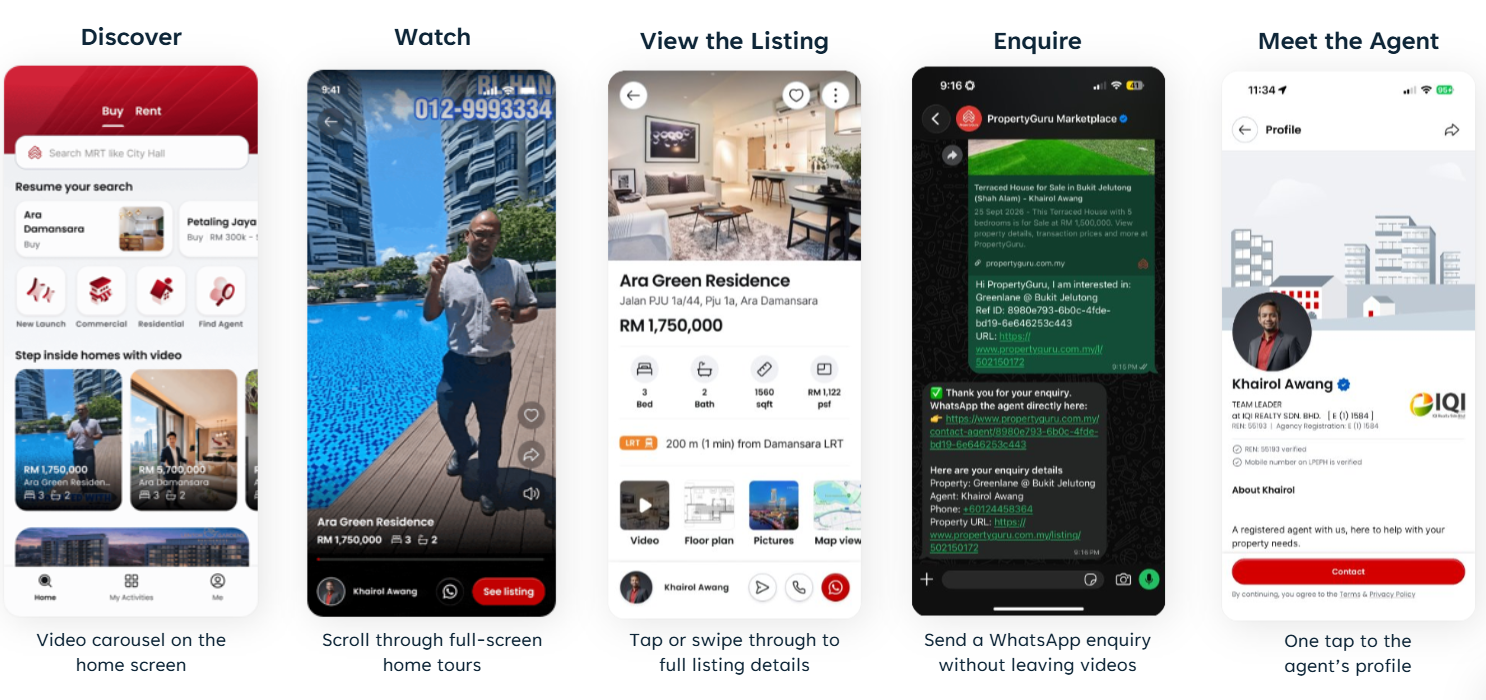
Our new video feed brings property listings to life on our PropertyGuru and iProperty mobile app’s front page, with a dynamic experience personalized to each viewer’s property interests.
Every video connects viewers directly to the property listing and the agent’s profile.
Who can participate? #
The feature is open to agents on all PropertyGuru and iProperty packages, regardless of agent tier.
How do I upload a video? #
Create or edit a listing in AgentNet, go to Gallery, and select Upload from album.
The video must be uploaded directly to the listing.
Is every video tied to a listing? #
Yes. Every video must belong to an active property listing.
Can I upload more than one video to a listing? #
Yes. However, only the first video that passes moderation will be featured in the main video feed.
What are the video requirements? #
Your video should be vertical, preferably in a 9:16 format, and show a walkthrough of the actual property.
The maximum file size is 100MB, with no maximum video length.
What types of videos are not accepted? #
Horizontal videos, photo slideshows, heavily AI-enhanced videos, and YouTube, TikTok or Vimeo links will not qualify for the feed.
Are audio, music, phone numbers and agents’ faces allowed? #
Yes. Audio, music, phone numbers, and agents’ faces are allowed in the video.
Can I still add YouTube, TikTok or Vimeo links to my listing? #
Yes. These links can still appear on the listing page, but they will not be featured in the video feed.
How are videos selected and ranked? #
Our relevance-based feed delivers a personalized experience, matching videos to each viewer’s preferred locations and property types.
This means there are no fixed positions, slots, or queues. Every video has the opportunity to reach the right audience.
How long will my video remain in the feed? #
Your video will remain eligible as long as the listing is active, and the video has passed moderation.
How often will my video appear? #
This depends on how many viewers are browsing the relevant location and property type.
How can I increase my video exposure? #
Please upload good-quality vertical walkthroughs to more of your active listings.
More eligible videos provide more opportunities to match viewers’ interests.
Who can watch the video feed? #
The feed is available to PropertyGuru and iProperty app viewers on iOS and Android.
When will the video feed be available to all viewers? #
From 12 October 2026, the feed will be available to 50% of app viewers selected at random. We expect to expand it to all viewers in November.
How long does video moderation and approval take? #
Video moderation is carried out daily.
Will I receive a reason if my video is rejected? #
No. Rejection reasons are not currently provided.
Can I re-upload a rejected video? #
Yes. Re-uploaded videos currently require a manual review. Please contact your account manager to request an on-demand review from our team.
Can I edit or delete my video? #
Yes. You can manage videos through the listing in AgentNet, in the same way you manage listing photos.
Can I share a video outside the app? #
The share button currently shares a link to the property listing. We are developing the ability to share the video directly and open it in the video feed when the recipient has our app installed.
Can I view statistics for my video? #
Video-specific statistics are not currently available.